이후에 할 PoC가 공개되지 않은 다른 1 day 취약점을 분석하기 위해 먼저 PoC가 공개되어 있는 취약점을 분석하며 Nuxt.js의 codebase를 분석하고 vscode에서 동적 디버깅을 하는 방법을 익힌다.
취약점 설명
CVE-2024-34343은 Nuxt.js에서 잘못된 URL 파싱으로 인해 XSS가 터지는 취약점이다. navigateTo() 함수 내부에서 ufo 모듈의 parseURL() 함수와 isScriptProtocol() 함수가 형식이 맞지 않는 프로토콜에 대해서 검사를 잘못하는 것 때문에 java\nscript:과 같이 중간에 공백을 넣으면 스크립트를 실행할 수 있는 프로토콜 우회가 된다.
이 취약점이 분명 <3.12.4 에서 발생한다고 나와 있는데 3.12.0 버전까지도 패치가 되어있다.
PoC
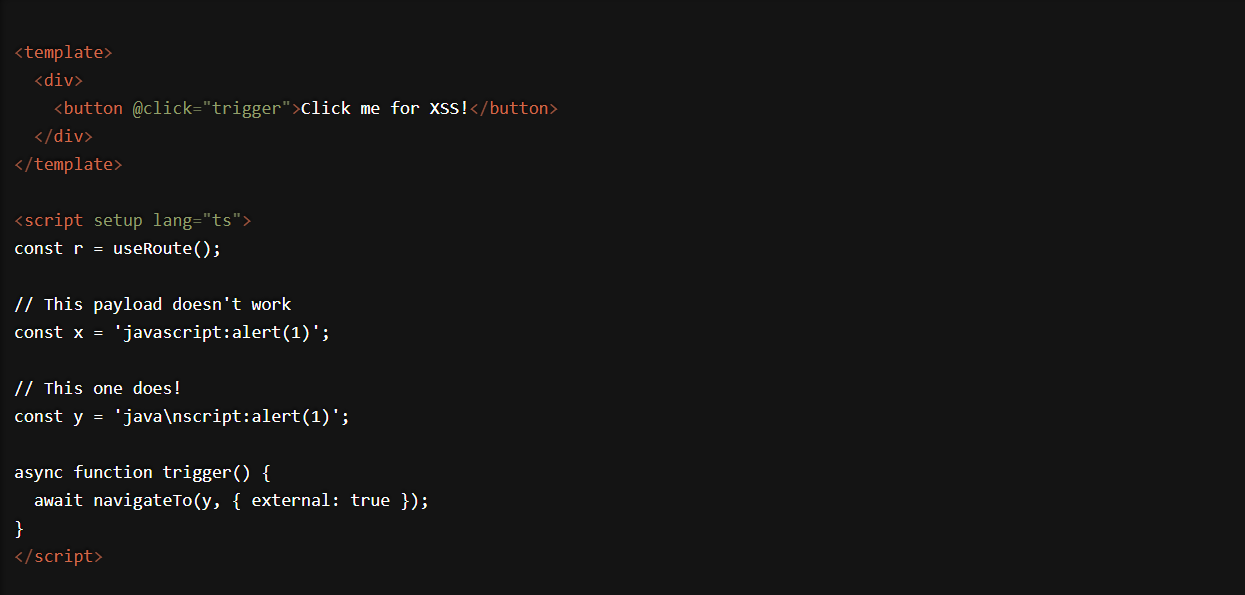
분석 전 과정
0. Nuxt.js 3.11.2 버전 설치
혹시 몰라서 vue와 vue-router의 버전도 고정시켰다.
npx nuxi@3.11.2 init nuxt-1day

✔ Are you interested in participating? y | n 선택

✔ Initialize git repository? y | n 선택

그 이후 질문은 enter
버전을 지정해서 설치했는데도 높은 버전이 설치되었을 경우
//버전 확인
npm ls nuxt
버전 확인 후 package.json 수정하고 node_modules와 .nuxt 폴더와 package-lock.json 삭제 후 다시 npm install
1. launch.json 설정
{
  // Use IntelliSense to learn about possible attributes.
  // Hover to view descriptions of existing attributes.
  "version": "0.2.0",
  "configurations": [

    {
      "type": "chrome",
      "request": "launch",
      "name": "client: chrome",
      "url": "http://localhost:3000",
      "webRoot": "${workspaceFolder}"
    },
    {
      "type": "node",
      "request": "launch",
      "name": "server: nuxt",
      "outputCapture": "std",
      "program": "${workspaceFolder}/node_modules/nuxt/bin/nuxt.mjs",
      "args": [
        "dev"
      ],
    }
  ],
  "compounds": [
    {
      "name": "fullstack: nuxt",
      "configurations": [
        "server: nuxt",
        "client: chrome"
      ]
    }
  ]
}
https://nuxt.com/docs/guide/going-further/debugging
Debugging · Nuxt Advanced v3
In Nuxt, you can get started with debugging your application directly in the browser as well as in your IDE.
nuxt.com
여기에 launch.json을 어떻게 설정해야 되는지 나와있다.
2. package.json에서 scripts에 "dev:debug": "node --inspect node_modules/.bin/nuxt dev" 추가
{
  "name": "nuxt-app",
  "private": true,
  "type": "module",
  "scripts": {
    "build": "nuxt build",
    "dev": "nuxt dev",
    "dev:debug": "node --inspect node_modules/.bin/nuxt dev",
    "generate": "nuxt generate",
    "preview": "nuxt preview",
    "postinstall": "nuxt prepare"
  },
  "dependencies": {
    "nuxt": "3.11.2",
    "vue": "3.3.4",
    "vue-router": "4.2.5"
  }
}
3. router.js에서 vscode 왼쪽의 run and debug 실행

4. 위쪽에 있는 설정을 fullstack:nuxt로 설정

5. fullstack:nuxt 왼쪽의 실행 버튼 클릭

6. 실행 버튼을 클릭했을 때 켜진 크롬의 개발자도구에서 node_modules/nuxt/dist/app/composables/router.js에서 문제가 되는 함수인 parseURL에 중단점 찍기

7. XSS 트리거 버튼 클릭

8. vscode로 돌아와서 분석 시작
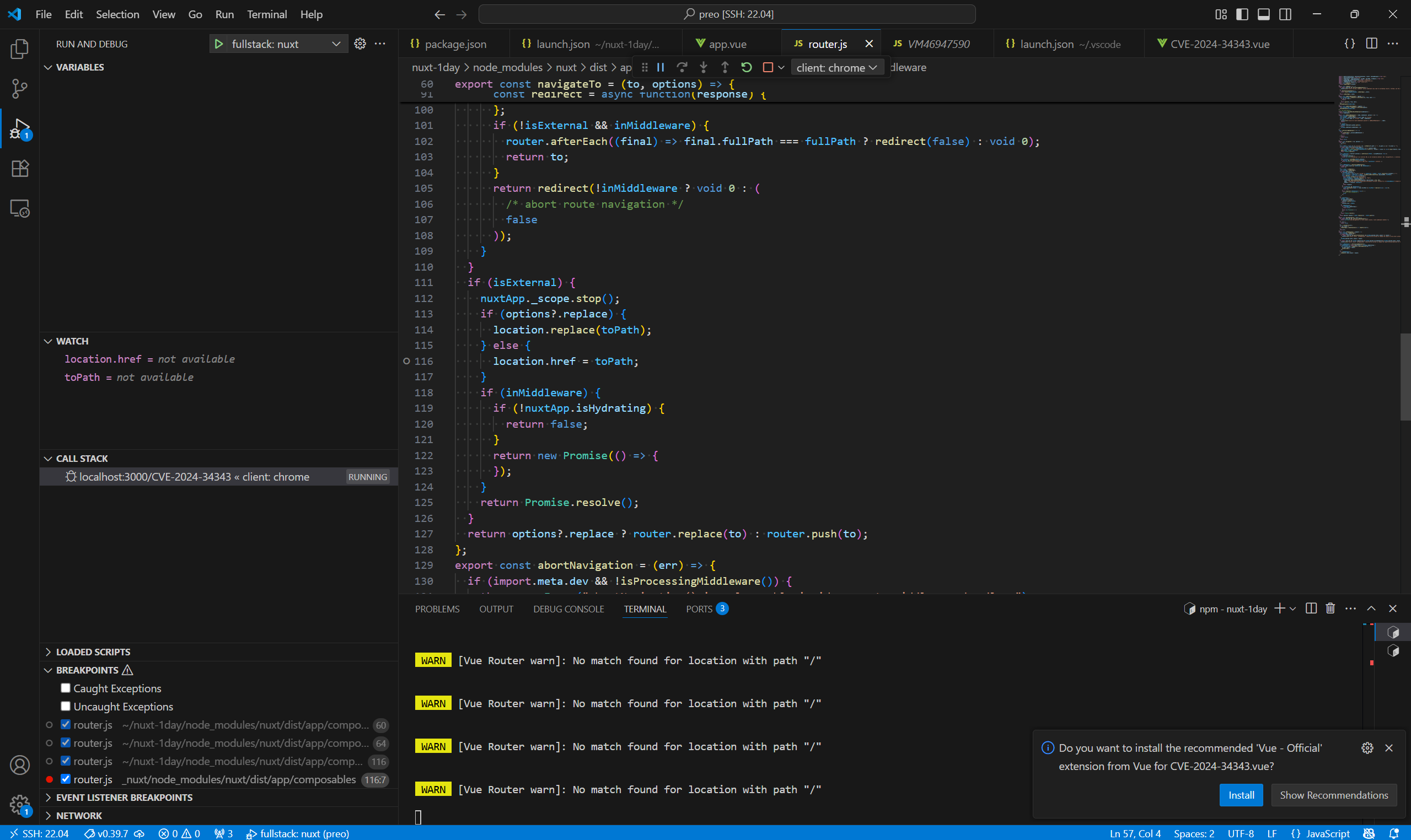
취약점 분석
개요
1. navigateTo 함수 사용 (navigateTo 함수는 페이지를 이동할 때 사용하는 함수)
2. navigateTo 함수 내부에서 이동할 URL을 검증할 때 ufo 모듈의 parseURL함수와 isScriptProtocol함수 사용
3. parseURL 함수의 잘못된 프로토콜 검증 정규식으로 인해 스크립트를 실행할 수 있는 프로토콜 통과
4. 그로 인해 스크립트를 실행할 수 있는 프로토콜인지 검증하는 isScriptProtocol 함수 통과
5. location.href = "{자바스크립트 실행 protocol}:{악의적인 스크립트}"로 인해 스크립트 실행
함수 분석 트리
navigateTo
-> parseURL
-> hasProtocol
-> parsePath
자세히
navigateTo
navigateTo 함수는 페이지를 이동할 때 사용하는 함수로
router.js에 navigateTo 함수가
export const navigateTo = (to, options) => {
  if (!to) {
    to = "/";
  }
  const toPath = typeof to === "string" ? to : withQuery(to.path || "/", to.query || {}) + (to.hash || "");
  if (import.meta.client && options?.open) {
    const { target = "_blank", windowFeatures = {} } = options.open;
    const features = Object.entries(windowFeatures).filter(([_, value]) => value !== void 0).map(([feature, value]) => `${feature.toLowerCase()}=${value}`).join(", ");
    open(toPath, target, features);
    return Promise.resolve();
  }
  const isExternal = options?.external || hasProtocol(toPath, { acceptRelative: true });
  if (isExternal) {
    if (!options?.external) {
      throw new Error("Navigating to an external URL is not allowed by default. Use `navigateTo(url, { external: true })`.");
    }
    const protocol = parseURL(toPath).protocol;
    if (protocol && isScriptProtocol(protocol)) {
      throw new Error(`Cannot navigate to a URL with '${protocol}' protocol.`);
    }
  }
  const inMiddleware = isProcessingMiddleware();
  if (import.meta.client && !isExternal && inMiddleware) {
    return to;
  }
  const router = useRouter();
  const nuxtApp = useNuxtApp();
  if (import.meta.server) {
    if (nuxtApp.ssrContext) {
      const fullPath = typeof to === "string" || isExternal ? toPath : router.resolve(to).fullPath || "/";
      const location2 = isExternal ? toPath : joinURL(useRuntimeConfig().app.baseURL, fullPath);
      const redirect = async function(response) {
        await nuxtApp.callHook("app:redirected");
        const encodedLoc = location2.replace(/"/g, "%22");
        nuxtApp.ssrContext._renderResponse = {
          statusCode: sanitizeStatusCode(options?.redirectCode || 302, 302),
          body: `<!DOCTYPE html><html><head><meta http-equiv="refresh" content="0; url=${encodedLoc}"></head></html>`,
          headers: { location: location2 }
        };
        return response;
      };
      if (!isExternal && inMiddleware) {
        router.afterEach((final) => final.fullPath === fullPath ? redirect(false) : void 0);
        return to;
      }
      return redirect(!inMiddleware ? void 0 : (
        /* abort route navigation */
        false
      ));
    }
  }
  if (isExternal) {
    nuxtApp._scope.stop();
    if (options?.replace) {
      location.replace(toPath);
    } else {
      location.href = toPath;
    }
    if (inMiddleware) {
      if (!nuxtApp.isHydrating) {
        return false;
      }
      return new Promise(() => {
      });
    }
    return Promise.resolve();
  }
  return options?.replace ? router.replace(to) : router.push(to);
};
이렇게 정의되어 있는데 to와 options를 인자로 받는다.
to는 어떤 페이지로 이동할 것인지를 나타내고 options는 페이지 이동 방식과 관련된 설정을 나타낸다.

to 인자가 설정이 안되어있으면 / 페이지로 이동한다.

to 인자의 타입을 검사해서 string이면 그대로, string이 아니면 경로를 가공해서 toPath 변수에 넣어주는데
to 인자의 타입이 string이므로 toPath에는 그대로 "java\nscript:alert(1)"이 들어간다.

import.meta.client는 현재 코드가 client 상에서 실행되고 있는지를 판단하는데
런타임 중에 디버깅이나 console.log로 확인하면 undefined로 나온다.
(Vite가 코드를 빌드할 때 true나 false로 치환하기 때문)
options?.open은 options 인자가 있을 때 open값을 확인하는 것인데 options인자에 open이 없으므로 undefined이므로 이 if문은 건너뛴다.

options?.external의 값은 우리가 options인자의 external값을 true로 지정해줬기 때문에 isExternal의 값은 true가 된다.

isExternal이 true이기 때문에 이 if문 내부로 들어가는데 !options?.external의 값은 false이므로 바로 다음의 if문은 실행이 되지 않고 문제가 되는 함수인 parseURL의 반환값이 protocol 변수에 들어간다.
parseURL
function parseURL(input = "", defaultProto) {
  const _specialProtoMatch = input.match(
    /^[\s\0]*(blob:|data:|javascript:|vbscript:)(.*)/i
  );
  if (_specialProtoMatch) {
    const [, _proto, _pathname = ""] = _specialProtoMatch;
    return {
      protocol: _proto.toLowerCase(),
      pathname: _pathname,
      href: _proto + _pathname,
      auth: "",
      host: "",
      search: "",
      hash: ""
    };
  }
  if (!hasProtocol(input, { acceptRelative: true })) {
    return defaultProto ? parseURL(defaultProto + input) : parsePath(input);
  }
  const [, protocol = "", auth, hostAndPath = ""] = input.replace(/\\/g, "/").match(/^[\s\0]*([\w+.-]{2,}:)?\/\/([^/@]+@)?(.*)/) || [];
  let [, host = "", path = ""] = hostAndPath.match(/([^#/?]*)(.*)?/) || [];
  if (protocol === "file:") {
    path = path.replace(/\/(?=[A-Za-z]:)/, "");
  }
  const { pathname, search, hash } = parsePath(path);
  return {
    protocol: protocol.toLowerCase(),
    auth: auth ? auth.slice(0, Math.max(0, auth.length - 1)) : "",
    host,
    pathname,
    search,
    hash,
    [protocolRelative]: !protocol
  };
}
parseURL 함수의 코드는 이렇게 되어 있다.

parseURL 함수의 인자인 input 값에 toPath를 넣어줬으므로 input은 "java\nscript:alert(1)"
위의 정규식은 [공백](blob:|data:|javascript:|vbscript:)(모든 문자열)을 대소문자 구분하지 않고 찾으므로
정규식에 매칭되지 않는다.
따라서 _specialProtoMatch의 값은 null이 된다.

그래서 이 if문을 건너뛰고

이 if문을 만나는데 hasProtocol 함수가 실행된다.
hasProtocol
hasProtocol함수 로직을 보면
const PROTOCOL_STRICT_REGEX = /^[\s\w\0+.-]{2,}:([/\\]{1,2})/;
const PROTOCOL_REGEX = /^[\s\w\0+.-]{2,}:([/\\]{2})?/;
두 if문 조건이 만족되지 않아서 결국 마지막 줄이 실행되는데
정규식에서 \s는 공백, 탭, 줄바꿈을 의미하고
\w는 [a-zA-Z0-9_]를 의미하는데
"java\nscript:alert(1)"은 \s\w에 해당하는 2글자 이상이고 ':'이 있으므로 정규식에 맞아서
결국 hasProtocol은 true를 반환한다.
parseURL
(다시 parseURL 함수로 돌아와서)

그러므로 이 if문은 건너뛴다.
※ 중요 ※

이 코드가 parseURL에서 가장 문제가 되는 부분인데 input값인 "java\nscript:alert(1)"에서
replace로 \를 모두 /로 치환하고 정규식에 매치되는지를 확인할 때 //가 있는지 판단한다.
하지만 input 값에는 //가 없으므로 protocol, hostAndPath는 '""가, auth는 undefined가 된다.

그러므로 그 다음줄에서 hostAndPath를 정규식에 매치되는지 확인하는데 hostAndPath = ""이므로 host와 path도 ""가 된다.

다음 if문은 file 프로토콜이 아니므로 건너뛴다.

그리고 path를 인자로 parsePath를 실행하는데
parsePath

이렇게 parsePath함수에서 정규식을 이용해 pathname, search, hash에 값을 넣어준다 해도 path=""이므로 값이 모두 ""일 것이다.
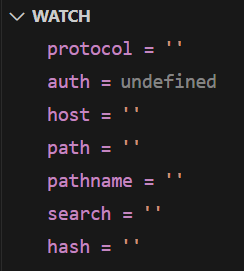
navigateTo
다시 navigateTo 함수로 돌아와서

protocol=""가 된다.

그래서 다음 줄에 있는 if문의 조건이 충족되지 않아 if문을 건너뛰어서 에러가 반환되는 것을 피할 수 있다.

inMiddleware 변수에 isProcessingMiddleware()함수의 반환값을 저장하는데
isProcessingMiddleware()함수의 내부 로직을 보면
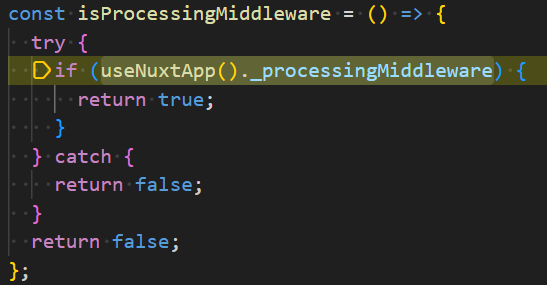
단순히 Nuxt의 미들웨어가 실행중인지 확인하는 함수이다.
하지만 미들웨어가 실행중이 아니므로 inMiddleware 변수에는 false가 저장된다.

다음 if문의 조건은 충족되지 않으므로 건너뛴다.

각각 변수에 Vue router 인스턴스와 Nuxt의 runtime context 객체를 저장한다.

마찬가지로 import.meta.server가 undefined이므로 이 if문은 건너뛴다.

isExternal이 true이므로 if문 내부가 실행되는데
※ 중요 ※

여기서 options인자에 replace는 지정하지 않았으므로 undefined이다.
따라서 location.href = "java\nscript:alert(1)"이 된다.
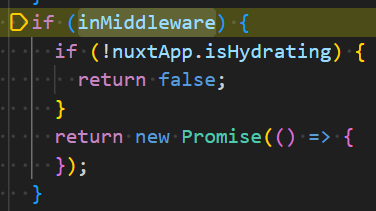
여기서는 inMiddleware가 false이므로 건너뛴다.

그래서 return Promise.resolve()가 실행되어 함수가 종료된다.
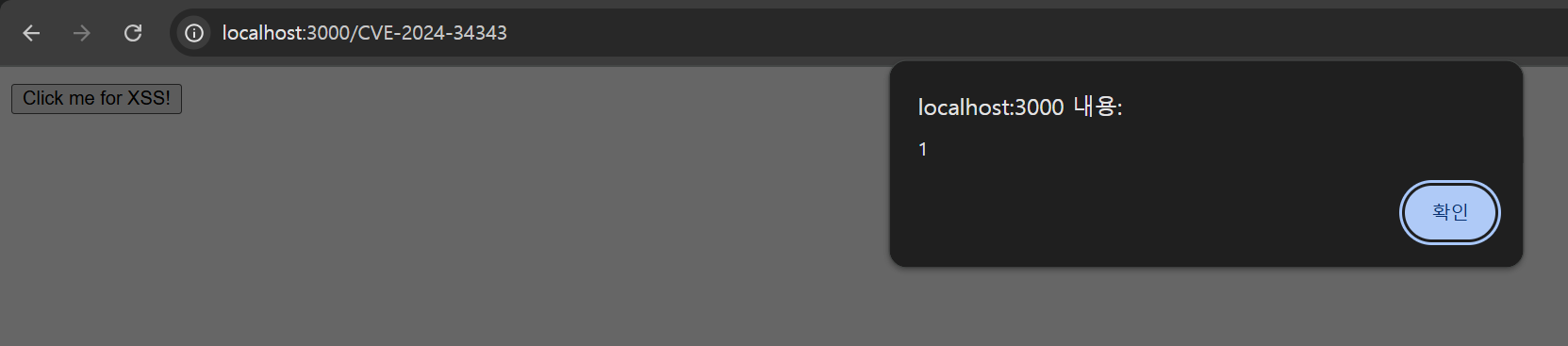
그래서 location.href = "java\nscript:alert(1)"가 실행되는데
브라우저의 정규화를 통해 \n이 사라지고 "javascript:alert(1)"이 되어 XSS가 발생한다.
취약점 패치
핵심적인 취약점 패치가 이루어진 부분이
const { protocol } = new URL(toPath, import.meta.client ? window.location.href : "http://localhost");
이 부분이다.
원래는 ufo 모듈의 취약한 함수인 parseURL을 통해 protocol에 값을 넣었는데
URL 함수를 통해 protocol에 값을 넣도록 바뀌었다.
URL 함수를 통해 url 정규화가 되므로 URL 함수를 통해 만들어진 객체의 protocol에는 "javascript:"이 담기게 된다.
그 후
    if (protocol && isScriptProtocol(protocol)) {
      throw new Error(`Cannot navigate to a URL with '${protocol}' protocol.`);
    }
이 코드를 통해 protocol이 script를 실행할 수 있는 protocol인지 검증하는데
const PROTOCOL_SCRIPT_RE = /^[\s\0]*(blob|data|javascript|vbscript):$/i;

function isScriptProtocol(protocol) {
  return !!protocol && PROTOCOL_SCRIPT_RE.test(protocol);
}
isScriptProtocol 함수를 보면 true를 반환해 if문 내부가 실행되어 에러가 나게 된다.

결론
이 취약점은 결국 navigateTo함수의 인자에 악성 스크립트가 들어있으면서 함수가 실행되어야 발생하는 것인데
페이지 이동 함수이므로 개발자가 특정 페이지로 이동하는 기능에 사용할 것이다.
그러므로 임의의 사용자가 직접 함수의 인자를 조작하거나 임의로 인자를 설정하는 상황은 발생하기 힘들다.
그래서 navigateTo함수를 사용할 때 단독으로 이 취약점이 발생하기는 어려울 것으로 보이며 함수의 인자에 변수가 들어가 있고 Prototype Pollution 취약점과 연계되었을 때 위험한 상황이 발생할 수 있을 것으로 보인다.
'project' 카테고리의 다른 글
| axios Prototype Pollution 1 day 취약점 분석 (0) | 2025.07.23 |
|---|---|
| CVE-2025-27415 1 day 취약점 분석 (0) | 2025.07.08 |
| CVE-2025-26923 (0) | 2025.07.02 |
| Nodejs로 게시판을 만들면서 찾아봤던 것들[1] (0) | 2024.11.05 |